|
|
|
|
|
Home |
|
|
 |
- The Home Glance displays:
|
|
|
|
|
|
|
|
Messages |
|
|
 |
- Displays the total number of unread messages
- New message previews are scrolled in sequence
- The
Iridium satellite network announces new
messages
- The inReach MINI 2 listens for new messages at regular
listen intervals
- New messages are recieved at the next listen interval
- The inReach MINI 2 must be in view of a satellite at the
time of the listen to receive messages
- A new message check can be initiated from the
Message
Check Glance
|
 |
 |
|
|
|
|
|
|
|
Tracking |
|
|
 |
- Displays current inReach Tracking activity status:
- 'Off': inReach Tracking is disabled
- 'Sending': Transmitting tracking point
information
- 'Updated': Elapsed time since last tracking point was transmitted
|
 |
 |
|
|
|
|
|
|
|
Navigation |
|
|
 |
- When not navigating to a destination:
- Compass displays current heading in degrees and cardinal letters
- While navigating to a destination:
- Compass displays distance and bearing to navigation destination
|
 |
|
|
|
|
|
|
|
Weather |
|
|
 |
- Displays weather forecast information for
the selected location:
- '- - -': No forecast information
available
- 'Updating': Forecast information loading
- Current Forecast:
- Forecast weather conditions for current
date/time
- Forecast temperature for current date/time
- Forecast high and low temperatures for current date
|
 |
 |
|
|
|
|
|
|
|
Message Check |
|
|
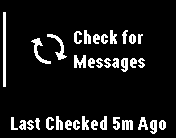 |
- Displays current Message Check status
- Messages
Glance is updated after Message Check is
complete
|
 |


