|
|
|
|
|
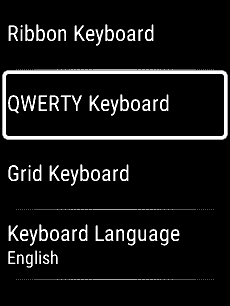
Change Keyboard |
|
|
|
 |
Opens the
keyboard selection
menu |
|
|
|
|
 |
 |
 |
 |
|
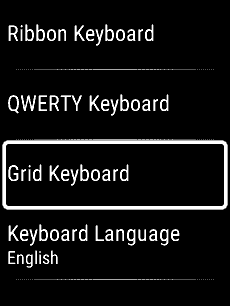
'Ribbon
Keyboard' |
'QWERTY
Keyboard' |
'Grid Keyboard' |
'Keyboard
Language' |
 |
|
|
|
|
|
|
|
|
|
|
Ribbon Keyboard |
|
|
|
|
|
|
Change keyboard |
 |
Move cursor one space right |
 |
Move cursor one space left |
 |
Backspace (delete) |
 |
Confirm current selection |
 |
Exit keyboard (abort) |
|
 |
Scroll up one ribbon selection |
 |
Scroll down one ribbon
selection |
|
|
Confirm current selection |
|
|
Press and Hold to select Predictions |
 |
Enable indicated ribbon |
|
|
|
 |
 |
 |
 |
|
Lower Case Ribbon Enabled |
Upper Case Ribbon Enabled |
Numbers Ribbon Enabled |
Symbols Ribbon Enabled |
 |
Enable Upper Case Ribbon |
|
 |
Enable Numbers Ribbon |
|
 |
Enable Symbols Ribbon |
|
 |
Enable Function Ribbon |
|
|
|
 |
 |
|
|
|
Function Ribbon Enabled |
'Hold OK For Predictions' |
|
|
 |
Enable Lower Case Ribbon |
|
|
|
|
|
|
|
|
|
|
|
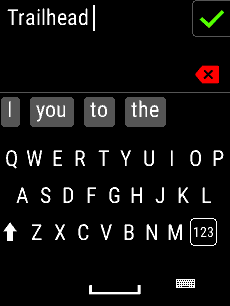
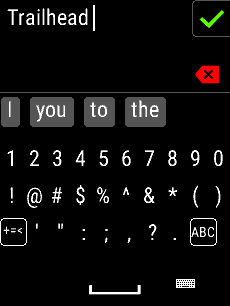
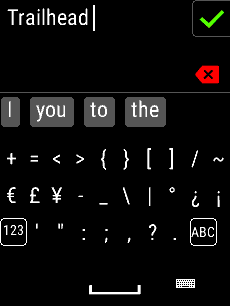
QWERTY Keyboard |
|
|
|
|
|
|
|
|
Confirm current selection |
|
|
Exit keyboard |
|
|
|
 |
 |
 |
 |
|
Lower Case Enabled |
Upper Case Enabled |
Numbers Enabled |
Symbols Enabled |
 |
Enable Upper Case |
|
 |
Enable Lower Case |
|
|
|
Enable Symbols |
|
|
|
Enable Numbers |
|
|
|
Enable Numbers |
|
|
|
Enable Numbers |
|
|
|
Enable Letters |
|
|
|
Enable Letters |
|
|
|
|
|
|
|
|
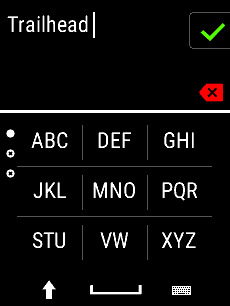
Grid Keyboard |
|
|
|
|
|
|
|
|
Scroll up one T9 text entry page |
|
|
Scroll down one T9 text entry page |
|
|
Confirm current selection |
|
|
Exit keyboard |
|
|
|
 |
 |
 |
 |
|
Upper Case Enabled |
Lower Case Enabled |
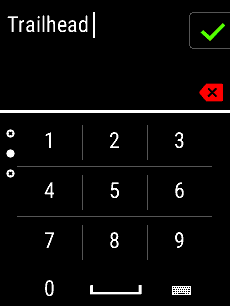
Numbers Enabled |
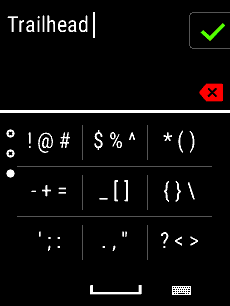
Symbols Enabled |
|
|
Enable Lower Case |
|
|
|
Enable Upper Case |
|
|
|
|
|
|
|
|
|
|
|
|
|
|
|
|
|
|
|
|
|
|
|


