 |
|
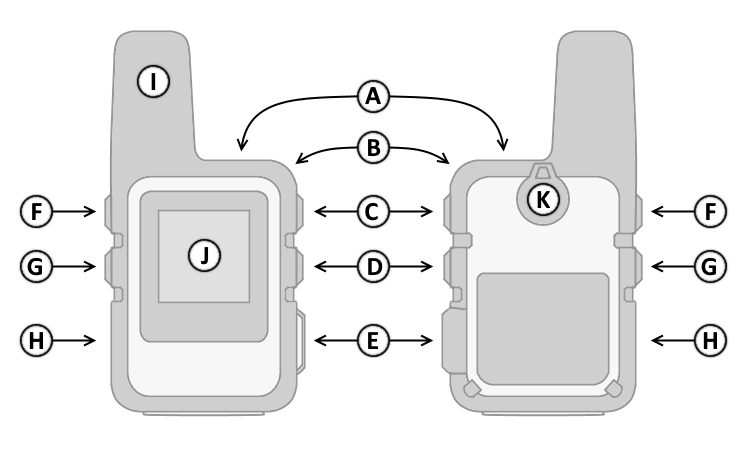
| A. | Power Button |
| B. | Lanyard Attachment |
| C. | OK Button |
| D. | Back Button |
| E. | SOS Button (Under Cover) |
| F. | Up Button |
| G. | Down Button |
| H. | Micro-USB Port (Under Cover) |
| I. | GPS + Iridium Antenna |
| J. | Display |
| K. | Accessory Mount |
|
|
|
| A. | Power Button |
| B. | Lanyard Attachment |
| C. | OK Button |
| D. | Back Button |
| E. | SOS Button (Under Cover) |
| F. | Up Button |
| G. | Down Button |
| H. | Micro-USB Port (Under Cover) |
| I. | GPS + Iridium Antenna |
| J. | Display |
| K. | Accessory Mount |
| A. Power Button | E. SOS Button | |
| 1. Press and hold to turn unit on/off. | 1. Lift protective cover. | |
| 2. Press > Up Button (F) to view battery charge in percent. | 2. Press and hold to initiate or cancel an SOS Rescue. | |
| 3. Press > 'Lock Screen/Unlock' to lock/unlock buttons. | F. Up Button | |
| 4. Press > 'Brightness' to adjust backlight brightness. | 1. Press and release to scroll through menus, | |
| 5. Press > 'Mute/Play Sounds' to disable/enable sounds. | pages and settings. | |
| C. OK Button | G. Down Button | |
| 1. Press and release to make menu selections and/or | 1. Press and release to scroll through menus, | |
| acknowledge messages. | pages and settings. | |
| 2. Press and release in home page to open main menu. | ||
| D. Back Button | ||
| 1. Press and release to cancel or return to the previous | ||
| menu or page. |
 |
Sending and receiving data | |
 |
Unable to send or receive data | |
 |
Tracking enabled | |
 |
Bluetooth connection status | |
 |
ANT+ connection status | |
 |
Extended Tracking mode enabled | |
 |
Battery charge level | |
 |
Battery charging | |
 |
Battery fully charged |
