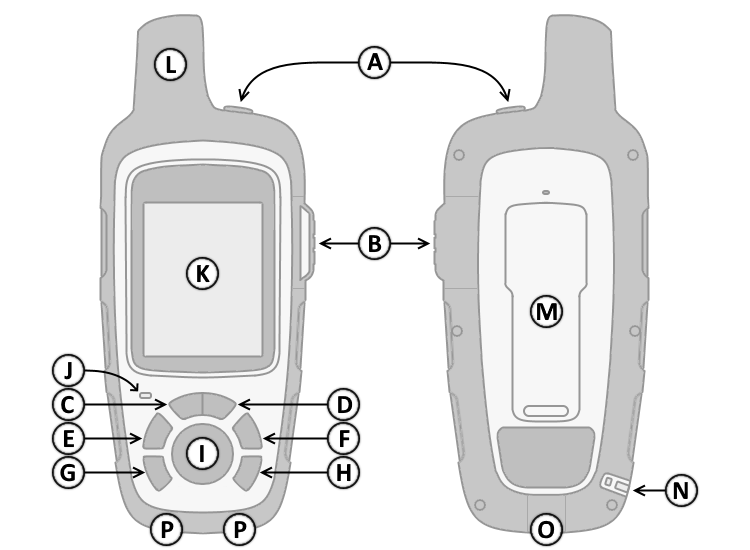
| A. Power |
|
F. Menu |
1. Press and hold
 to turn unit on/off. to turn unit on/off. |
|
1. Press
 to open Page menu.
 |
1. Press
then
 or
or
 to adjust backlight brightness.
 |
|
2. Press
to open the Home Page. |
| B. SOS |
|
G. Cancel |
|
1. Lift Protective Cover. |
|
1. Press
 to cancel or return to the previous page.
 |
|
2. Press and hold to initiate or cancel an
SOS Rescue. |
|
H.
Enter |
| C. Zoom
Out |
|
1. Press
 to make menu selections and/or acknowledge to make menu selections and/or acknowledge
|
1. Press
 to zoom out on the map. to zoom out on the map. |
|
notifications and messages. |
| D. Zoom In |
|
I.
D-PAD |
1. Press
 to zoom in on the map. to zoom in on the map. |
|
1. Press

 to navigate menu options or move
 |
| E.
Shortcut Menu |
|
the map cursor. |
1. Press
 to open the Shortcut menu. to open the Shortcut menu. |
|
|