|
|
|
|
|
|
|
|
|
Overview |
|
|
|
Introducing inReach SE |
|
The satellite communicator that allows you to type, send and
receive, track and SOS all from the palm of your hand. |
|
From LOL to SOS and every message in between, DeLorme inReach SE
makes any adventure better. With inReach SE, you can both send
and receive text messages at the ends of the earth and
everywhere in between with the handy color screen and virtual
keyboard. When you're off the grid and out of cell phone range,
you can quickly and easily share your journey with family and
friends, let them ping and message you, and always receive a
delivery confirmation that your message was sent -- all thanks
to the Iridium satellite network with 100% global coverage. And
in the event of an emergency, you can trigger an SOS, receive
delivery confirmation, and then have an two-way text
conversation with the search and rescue monitoring center until
help arrives. |
|
|
|
inReach SE: How It Works |
|
inReach SE (Screen Edition) is the satellite communicator from
DeLorme that puts amazing functionality in the palm of your hand
without having to pair the device: |
- Send and receive free-form, 160-character text
messages outside of cell phone range.
- Trigger an SOS and interact back and forth with
GEOS, our 24/7 search and rescue monitoring center.
- Turn on tracking to share and view GPS
coordinates.
- Color screen and virtual keyboard with
predictive text.
- Intuitive LED indicator for satellite
availability.
- Audible message notifications.
- Internal, rechargeable lithium battery lasts
about 100 hours at continuous operation at 10-minute
tracking intervals with a clear view to the sky.
Extended tracking mode can extend battery life even
more for long-haul trips.
- Designed for maximum durability in harsh
environments (waterproof, dustproof, and
impact-resistant).
- Post to social media.
- Built on award-winning technology pioneered with
our first inReach device.
|
|
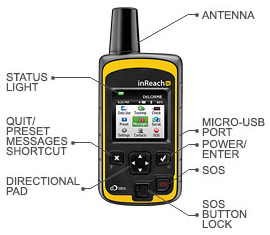 |
|
|
|
|
Pair inReach SE for the Complete Experience |
|
Both inReach models can be used in conjunction with DeLorme's
Earthmate app on a mobile device and our Explore web portal.
When paired with your mobile device, the capabilities of either
inReach product is enhanced. Previously downloaded map data is
only accessible during paired mode. Pairing inReach allows you
to use your mobile device to send messages from the Earthmate
app. |
|
|
|
Earthmate App |
|
Transform your smartphone or tablet into a global satellite
communication and navigation tool with our free Earthmate app: |
 |
- Worry-free navigation and journey tracking.
- Unlimited access to downloadable topographic maps and
NOAA charts on your paired mobile device.
- Automatically syncs with your mobile device's address
book for easy texting.
- Pairs via Bluetooth.
|
|
|
|
Explore Web Portal |
|
Prepare and share your journey with family and friends with our
Explore web portal: |
- Share your location and trip details with MapShare,
including tracking and GPS information.
- Invite others to "ping" your inReach to see your
location, activate tracking and exchange messages.
- Load preset messages to your inReach.
- Link to your social media accounts.
- View all your previous trips and messages.
- Manage your account and settings, including emergency
contacts.
- Update your inReach firmware.
|
|
|
|
Use It. Abuse It. But Don't Lose It. |
|
Prepare and share your journey with family and friends with our
Explore web portal: |
- Color screen with predictive, virtual keyboard for
standalone two-way messaging.
- GPS accuracy to +/- 5 meters.
- Water rating: IP67 (withstands incidental water
exposure; tested for submersion at one meter for 30
minutes).
- Rugged, dustproof and impact-resistant (Mil-STD-810G for
shock; IP67 for dust).
- Impact-resistant (Mil-STD-810G for shock).
- 100 hours of battery life in 10-minute tracking mode
with a clear view to the sky.
|
|
|
|
Easy to Use Home Screen |
|
Convenient 160-Character Messaging |
|
Virtual Keyboard with Predictive Text |
|
Interactive SOS Communications |
| |
|
|
|
|
|
|
 |
|
 |
|
 |
|
 |
| |
|
|
|
|
|
|
| Easily access and
view on-screen messages, tracking information,
subscription data usage and user settings. |
|
Send and receive
text messages worldwide, including a delivery
confirmation from the satellite. |
|
Virtual keyboard
with predictive text makes sending free-form text
messages possible without pairing inReach to a mobile
device. |
|
Interact with the
search and rescue monitoring center to communicate the
nature of your distress and stay in touch throughout the
rescue process. |
|
|
|
|
|
|
|
|
Specifications |
|
|
|
Part Number |
AG-009871-201 |
|
Unit Dimensions |
2.46" x 5.83" x 1.04" (6.3 cm x 14.8 cm x 2.6 cm) |
|
Display Size |
1.4" x 1.2" (3.5 cm x 3.0 cm), 1.8" (4.7 cm) diagonal |
|
Display Resolution |
150 x 120 |
|
Display Type |
Color LCD |
|
Weight |
6.7 oz (190 g) |
|
Battery Type |
Internal Rechargeable Lithium Polymer (2450 mAh @ 3.7V) |
|
Battery Life |
100 hours (sending one track point every 10 minutes with clear
view of the sky) |
|
Charging Temperature |
32 F to 113° F (0° C to 45° C) |
|
Operating Temperature |
-4° F to 140° F (-20° C to 60° C) |
|
Storage Temperature |
-40° F to 185° F (-40° C to 85° C) |
|
Impact Resistant |
MIL STD 810G |
|
Waterproof |
Yes (IP67) |
|
Floats |
No |
|
Interface |
Micro
USB |
|
GNSS Receiver |
- |
|
GNSS Antenna |
Patch |
|
GNSS Constellations |
GPS |
|
Accuracy |
+/- 5 meters |
|
Iridium Modem |
9603 SBD |
|
Frequency Spectrum |
1.61 GHz to 1.63 GHz |
|
Transmit Power |
7.5 W (peak) |
|
Pairs With Mobile Devices |
Yes |
|
Two-Way Global SOS |
Yes |
|
Two-Way Text Messaging |
Yes |
|
Message Size |
160 characters |
|
Message Delivery Confirmation |
Yes |
|
GPS Tracking and Sharing |
Yes |
|
Location Pinging |
Yes |
|
Altimeter |
No |
|
Barometer |
No |
|
Compass |
No |
|
Accelerometer |
No |
|
Waypoints |
No |
|
Routes |
No |
|
Navigation |
No |
|
Trip Data |
No |
|
Track Log |
No |
|
|
|
|
|
Documents |
|
|
|
DeLorme inReach SE Quick Start Guide |
|
DeLorme inReach SE User Manual |
|
DeLorme inReach SE Brochure |
|
DeLorme inReach Brochure 2013 |
|
DeLorme inReach Brochure 2015 |
|
DeLorme inReach
Series Features |
|
DeLorme inReach SE External Photos (FCC) |
|
DeLorme inReach SE Internal Photos (FCC) |
|
|
|
|
|
Update History |
|
|
|
3.2
(31MAR22) |
|
New |
- Added support for forwarding text messages.
- Added
support for updating the address of a message received from an
unknown address.
- Added support for retrying weather requests.
- Added new unit settings for the wind speed shown in weather
forecasts.
|
|
Updated |
- Updated world magnetic model
for improved magnetic declination calculations.
|
|
Fixes |
- Fixed issue with data use counts not resetting at the start
of a new year.
- Fixed issue with check page not updating
properly when a check completes.
- Fixed issue with
occasionally failing to complete a Mail Check.
- Fixed display
issue on the tracking page when moving interval is set to off.
- Fixed issue with displaying incorrect UTM zone letters in the
southern hemisphere.
- Fixed issue with entering or editing UTM
coordinates that are near the equator.
- Fixed issues with
editing and displaying UTM/UPS and USNG/MGRS coordinates in the
polar regions.
- Fixed potential issue with weather requests
not completing for locations saved from My Location.
- Fixed
potential issue with available tracking intervals being
incorrect after checking for a Plan Update.
- Fixed issue with
incorrectly showing a low battery warning on the activation
page.
|
|
|
|
2.16 (10AUG17) |
|
New |
- Improved UI performance.
- New quick links in
messages threads for SMS and email address sent to the device.
|
|
|
|
2.15 (16DEC16) |
|
New |
- Multiple improvements to Weather.
- Updated URLs for
website.
- Added user's inReach Address to the About page.
|
|
Fixes |
- Display should now always stay on during
activation.
|
|
|
|
2.14 (06OCT16) |
|
New |
- New splash screen to remind users the device needs
active service for full functionality.
- Basic and Premium
weather provider name changed to "Dark Sky". The forecasts are
the same.
|
|
|
|
2.13 (16AUG16) |
|
New Features |
- Updated World Magnetic Model.
- New weather
condition icon for forecasts with clear skies and a slight
chance of rain.
|
|
Fixes |
- Improved Lock Screen behavior.
|
|
|
|
2.12 (02JUN16) |
|
New Features |
- Enterprise Accounts - Device will now always
reboot and send a confirmation message after receiving device
commands or profiles via an Iridium message.
|
|
Fixes |
- Resolved issue when using Auto Track When On and Extended
Tracking features at the same time.
- Improvements to the
activation and Suspension processes on the device.
- Various
minor UI fixes.
|
|
|
|
2.11 (27APR16) |
|
New Features |
- Weather is here!
- Receive satellite weather forecasts directly on your
inReach anywhere in the world.
- Detailed land and marine weather data available for your
current location, a waypoint, or by manually entering
coordinates.
- Pair with Earthmate for easy-to-read, full-size forecast
graphics.
- Significant performance improvements when sending
multiple messages or track points.
|
|
Fixes |
- Improved activation process when device may take longer
than 15 minutes to activate.
- Fixed issues where receiving messages may have been
delayed when inReach is Logging only.
- Fixed issue with the “Auto Off w/out External” setting
and the device being under 25% charged.
- Extra confirmation dialog now displays when canceling
SOS by holding down the button.
|
|
|
|
2.10 (19FEB16) |
|
Note: This firmware displays as Firmware Version 2.10.69885
under Settings > About this Device. |
|
New Features |
- Screen Brightness default changed from 50% to 100%.
- Listen Interval default changed from 20 minutes to 10
minutes.
|
|
|
|
2.10 (11DEC15) |
|
Note: This firmware displays as Firmware Version 2.10.67008
under Settings > About this Device. |
|
New Features |
- Added all new Team Tracking support for Enterprise
users. Create teams of up to 50 devices and see the location
for all other inReach devices on paired Android / iOS apps
even when disconnected from WiFi or cellular service!
|
|
Fixes |
- Solved issue which may have led to lower than expected
battery life.
|
|
|
|
2.10 (09DEC15) |
|
Note: This firmware displays as Firmware Version 2.10.66122
under Settings > About this Device. |
|
New Features |
- Reduced length of time Preset Message button needs to be
held to access Preset menu option.
- Improved backlight behavior during SOS events.
- Increased screen timeout for power on confirmation.
- Power button can now be pressed and held to confirm
Power On selection.
- Presing and holding Power button when Power Off menu is
visible no longer resets the menu.
|
|
Fixes |
- Addressed rare issue where the Help menu icon could be
missing.
- Fixed Lock Screen timeout issue while the screen was
still being used.
- Fixed issue where messages could be delivered out of
order if they were created when the inReach did not have a
GPS fix.
|
|
|
|
2.8 (03SEP15) |
|
Note: This firmware displays as Firmware Version 2.8.58246 under
Settings > About this Device. |
|
Fixes |
- Allows users to turn the Send Interval to OFF so
Explorer users can record a GPS log without sending Track
Points.
- Changed Tracking “Start Sending” button to “Start”.
- Fixed display errors of specific lines on the Explorer
Map display.
- Fixed issue on the Location page where the lat/long were
not entirely visible in rare cases.
|
|
|
|
2.8 (06AUG15) |
|
New Features |
- Faster message/track point sending. The inReach will
spend less time between sending attempts to improve
throughput.
- Wireless Sync – When used in range of a cellular data or
WiFi connection an installation of the Earthmate mobile app
paired with and connected to an inReach will Sync contacts
and messages from the explore.delorme.com account associated
with the paired inReach to the app. The changes are then
Synced wirelessly via Bluetooth to the inReach device.
- Note: Use of inReach Desktop Sync is still available at
any time and required to perform inReach firmware updates.
|
|
Fixes |
- Data Use page correctly counts Locate Request and Locate
Response as Track Points.
- Fixed rare Map issue when panning over very dense data.
- Updated text for reversing a route on the inReach
Explorer.
- Fixed issue where navigating towards an edited waypoint
may fail to send a message to the server.
- Resolved issue with Settings -> Messages -> Listen
Interval -> Continuous.
- Prevent rare situation where the inReach may send the
same message multiple times.
- Fixed issue where "Ring until message is read" option
did not ring continuously if device was viewing associated
message thread.
|
|
|
|
2.7 (16JAN15) |
|
New Features |
- Faster Bluetooth data transfers between inReach and the
Earthmate application.
|
|
Fixes |
- Text change in the Activation Wizard so it matches the
website.
- Various Bluetooth fixes to ensure data is transferred
more reliably after disconnects or when dealing with
navigation features.
- Fixed rare issue where a sent message could fail to
display on the inReach if it was sent from a paired device.
- Explorer - GPS now remains on for a short period of time
after the "You've arrived at your destination" screen
appears.
- Explorer - Waypoints list will honor the user's
selection for True or Magnetic North in Settings.
- Bluetooth will properly remain off if you enable
Extended Tracking while connected.
|
|
|
|
2.6.5 (07NOV14) |
|
Note: This firmware displays as Firmware Version 2.6.34915 under
Settings > About this Device. |
|
Fixes |
- Bluetooth will properly remain off if you enable
Extended Tracking while connected.
- If a paired and connected mobile device and the inReach
are both Synced the inReach screen will display Quick Text
message content from the paired device.
|
|
|
|
2.6.4 (24OCT14) |
|
Note: This firmware displays as Firmware Version 2.6.34147 under
Settings > About this Device. |
|
New Features |
- Support for Navigation features in the Android and iOS
mobile applications.
- SOS warning alarm will not make noise if the inReach is
muted.
- Improved performance for larger message threads
|
|
|
|
2.6.3 (26SEP14) |
|
New Features |
- New Extended Tracking setting for greatly increased
battery life on devices used primarily for tracking. You can
enabled this under Settings -> Tracking. Once enabled,
certain features will be disabled to ensure you get maximum
battery life.
- Devices will now automatically send a mailbox check if
it has not been used for 6 or more hours.
- Explorer - Waypoints within ~10 meters of a route are
now considered part of the route. The Distance field on the
Compass and Map page will display the distance to the next
waypoint. The Route field on the Waypoint page will display
the name of the next waypoint.
|
|
|
|
2.6.2 (03JUL14) |
|
New Features |
- Explorer and SE - Setting added to leave the screen on
when device is connect to external power source. You can
find this in Settings -> Display -> Always On w/Ext Power.
|
|
|
|
2.6.1 (21MAY14) |
|
New Features |
- Explorer and SE - Over the air Activation and Plan
Details Update process improved!
- Explorer and SE - GPS will remain on when the screen is
on. This should improve GPS fix when messaging.
- Explorer - Map will default to a previous location when
the GPS is getting a fix.
- Explorer - You can Sync routes from the website to the
Explorer and navigate the routes or view details of them.
- Routes will always show on the map, you can toggle these
off by going into the Routes page, click on the route, then
uncheck the box.
- Explorer - Added an option to Navigate to the start of a
Route.
|
|
Fixes |
- Explorer and SE - Enterprise devices will have Social
feature disabled by default.
- Explorer - Change the "You've arrived at [Destination]"
message to "Arriving at [Destination]" and it plays the
sound earlier.
- Explorer - Fixed cases where the GPS log time and the
sent track point time were slightly off.
- Explorer - Waypoint list sorts by distance correctly.
- Explorer - The Explorer will log less points when not
moving.
- Explorer - Pressing X while navigating will bring you
back to the Map instead of through stale dialogs.
- Explorer - Enhanced speed of GPS log clearing and
Factory reset.
- Explorer - Improved accuracy of Moving Average.
- Explorer - Yellow sent track point dots on the Map will
now draw correctly on the GPS log line instead of under it.
|
|
|
|
2.5 (24MAR14) |
|
New Features |
- inReach SE now supports no contract Freedom Plans.
- Data Use page updated to display plan details about
message counts, plan information, and renewal dates.
- Data use can be updated by selecting Plan Details ->
Check for Updates.
- Powering on the inReach now has a second confirmation
step to prevent accidental power usage. To power on the
inReach press and hold ENTER, then press the left arrow to
select Unlock and tap ENTER again.
- New screen lock to prevent accidental button presses
when the inReach is in a pack or pocket. This option can be
disabled in Settings -> Display -> Screen Lock.
- SOS behavior updated as follows:
- Alert sound plays
during the SOS countdown.
- Status bar will flash red SOS IN
PROGRESS text while the inReach is in SOS mode.
- If you
receive a message from Emergency Services, the inReach will
beep until you read the message.
- SOS tracking intervals
updated to send a point every 1 minute for the first 10
minutes, then send another point every 10 minutes if you are
moving or 30 minutes if you are stationary.
- Keyboard
accent characters now display in orange. To display
available accent characters press and hold ENTER on a
character identified with a mark in the upper right corner.
Press ENTER to choose an accented character or X to revert
to the keyboard.
- Help documentation on the inReach has
been updated to reflect new functionality and updates.
|
|
Fixes |
- The inReach SE is now less likely to create duplicate contacts
when the same SMS number is formatted differently.
- Free
messages sent to or received from test@delorme.com will not
increment the message counter on the inReach.
- Predictive text
will now work on forms for enterprise customers (contact your
DeLorme sales representative for more information).
|
|
|
|
2.4 (04FEB14) |
|
Fixes |
- Fixed issue where an incorrect icon may have been
displayed next to old messages.
- Resolved problem caused by sending and deleting certain
messages when no signal was present.
|
|
|
|
2.4 (17DEC13) |
|
New Features |
- New Location page.
- The Location page will show current GPS position, speed,
course, elevation, and GPS accuracy of inReach SE.
- The inReach SE GPS is active any time Location page is
displayed and the screen is illuminated.
- GPS location information can be shared via a message by
clicking a button at the bottom of the Location page.
- BoatU.S. page added to the SE for BoatU.S. customers.
- The BoatU.S. page allows for two way messaging between
the user and BoatU.S. response teams.
- After activating BoatU.S. on an Explore account, Sync
the inReach SE to enable the icon to show on the Home
Screen.
- Volume of all device sounds is louder.
- A new option to have a notification sound play
continuously until a newly received message is read is now
available inSettings -> Messages.
- Synced addresses will work better so you can type more
characters into messages.
- This works with the updated Earthmate app for iOS and
Android.
- Activating an inReach SE will add the inReach address of
your inReach SE (@inreach.delorme.com address) to the
Contacts page.
- Updated Help document on the SE regarding "Syncing with
the Explore Site".
- New options for custom data collection forms are
available for Enterprise customers.
|
|
Fixes |
- High temperature warning message will only display once
per power cycle. The exclamation mark in the status bar will
continue to display if the device is hot.
- Fixed issue where the bottom of some text was being cut
off on the Preset messages page.
- Powering off an inReach SE will play a sound when the
lock screen appears, and another sound when the device
powers off.
- Daylight Saving setting is now ignored when UTC time is
being used.
- Tracking behavior improved in some situations.
- Fixed issue where the Preset message page could display
when the SE was in another activity.
|
|
|
|
2.3 (26SEP13) |
|
Fixes |
- Updated Bluetooth functionality.
- Various performance improvements.
|
|
|
|
2.2 (06SEP13) |
|
Fixes |
- Various stability improvements.
|
|
|
|
2.1 (26JUL13) |
|
New Features |
- SEs can now sync addresses, Quick Text messages and
other data with the Explore website.
|
|
Fixes |
- Battery profile updated to act more consistent at low
battery readings.
- International SMS messaging should work correctly with
10 digit numbers.
- Improved USB reliability when updating firmware using a
Mac.
- Improved behavior when disconnecting from external
power.
|
|
|
|
2.0 (20MAY13) |
|
New Features |
- Message read and unread status syncs over Bluetooth
connection.
- If Bluetooth is off and a user tries to pair, the SE
will enable Bluetooth.
- Screen brightness values are now better distributed and
the screen can get darker at the lowest setting.
- Options for device power on or off when power is
connected or disconnected.
|
|
Fixes |
- Improved performance of GPS chipset.
- Multi-byte characters display correctly in the message
bubbles (ex. Cyrillic).
- Deleting all fields from a contact now deletes the
contact.
- inReach SE will no longer reboot when sitting at the
edge of Bluetooth connectivity.
- Charge percentage indicator is now always displayed in
white text.
- Text prediction will not try to predict full first and
last name when attempting to enter only a first name.
- Network registration works correctly if you travel a
long distance between receiving messages.
- Message status icon updates when resending a failed
message.
- "Do you want to discard changes" message now shows up
only at the correct times.
- Battery warning will not display during a SOS countdown.
- 100% sound volume no longer sounds like 40% volume.
|
|
|
|
|

