 |
|
|
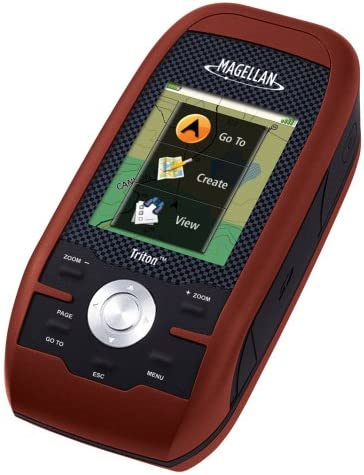
The new Magellan Triton 200 is built tough, with the
latest hardware - yet its simple software interface is a
snap to operate. The Triton 200 gives you a full color
screen, a built-in map database and essential
easy-to-use navigation features, making it an unmatched
value in its class. The Magellan Triton series reinvents
handheld GPS with a smartly designed interface and
simple menus that make navigation fun and effortless.
The full-color crystal clear display shows all your maps
and navigation information in brilliant, easy-to-view
graphics. Quickly view all your locations and saved
tracks and waypoints using the intuitive user interface
and direct-access buttons. Unlike complicated devices
that require you to scroll through screen after screen,
Triton 200 gets you to the information you want in two
or three clicks. Triton is designed for precision navigation, offering the fastest GPS positioning acquisition in the industry with the SiRFstar III chipset. An integrated high-sensitivity antenna provides reliable signal reception even in heavy cloud cover, canyons or deep woods. Built-in signal augmentation reception (WAAS/EGNOS) provides 3-meter accuracy. Rugged and waterproof, your Triton 200 is built to withstand intense use, accidental impact and immersion in one meter of water for up to 30 minutes (IPX-7). It's ready to guide you on any adventure. The advanced features are also easy to use. View the elevation profile for the trail ahead (or any route). See the precise time of sunrise/sunset any day of the year. Get a calculation of the best hunting and fishing time. And much more. Exclusive VantagePoint software (optional, purchase of data cable required) lets you easily manage user generated content, updates and upgrades on your PC. View saved routes and tracks. Customize them for future trips or create new ones. Triton is built on the experience of GPS users over nearly 20 years of precision positioning technology from Magellan. Triton 200: Embrace the challenge! |
- Amazing ease-of-use - Reinventing
handheld GPS, simple menus, instant access buttons,
intuitive scroll pad and crystal clear graphics let you
navigate without the need for a Ph.D.
- Full-color 2.2" display - The large
display shows maps, simple menus, navigation screens and
other data in brilliant color
- Built-in maps - Basemap of the 48
contiguous United States, Alaska, and Canada (major
highways, city centers, bodies of water and more) plus
worldwide geographic boundaries
- Compass screen - See your direction of
travel, distance and position of destination, heading,
bearing, speed and more on the beautiful graphic compass
screen
- 3-meter accuracy - SiRFstar III chipset
and integrated multidirectional antennae offer superior GPS
accuracy using the Wide Area Augmentation System (WAAS)
- Access exclusive VantagePoint software
- Lets you easily manage user generated content, updates and
upgrades on your PC. View saved routes and tracks. Customize
them for future trips or create new ones. Optional (requires
purchase of Data Cable)
- Add detailed maps - Upload optional
marine cartography, topographic maps, and other data
including the highly-detailed and feature-packed National
Geographic TOPO! State series and Weekend Explorer 3D maps
based on USGS 1:24.000 series quads -- Optional (requires
purchase of Data Cable)
- Access to Main Menu From Any Navigation Page - The ability to access the Main Menu (Go To, Create, View) from any Navigation Page.
- Improved Track Management - The ability to Start, Stop, Resume Track from the contextual menu.
- Improved Route Management - The ability to Go To Next or Go To Previous point while in an active route.
- User Grid Coordinate System (Based on Additional Coordinate Systems) - Added customizable User Grid functionality based on additional coordinate system, including Lambert Conic, Stereograph, Oblique Mercator, UTM, and Polyconic.
- Area Calculation - The ability to calculate an area based on active track, saved trails, and saved routes.
- Added optional Navigation Fields to Map screen for Triton 300/400/500 devices.
- Added Quick Info on Map screen.
- Contextual menu improvement.
- Power Saving - reduce backlight if battery level is 50% or lower.
- Electronic Compass User Calibration UI improvement.
- Move low-level settings (e.g., time zone and power timer settings) from the Profiles to Settings.
- Add additional settings to Profile.
- New Coordinate and Elevation Entry UI.
- New Strip Compass Navigation screen.
- New Road Navigation screen.
- User Grid (Trans. Mercator only).
- Coordinate Fields display on the Info pages.
- User Object Selection improvement.
- Option to clear active track after trail was created.
- Option to turn ON/OFF Navigation Screens.
