|
|
|
|
|
Start Activity |
|
|
 |
- View inReach Tracking status
- Start a new Activity Recording
 |
Open
Activity Controls
page |
 |
Select previous Main Menu item |
 |
Select next Main Menu item |
|
|
|
|
|
|
|
|
Tracking |
|
|
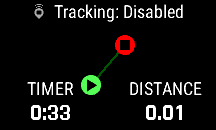 |
- View inReach Tracking status
- View current Activity recording map overview
- View current Activity recording timer
- View current Activity recording distance
|
|
Open
Tracking
page |
|
|
Select previous Main Menu item |
|
|
Select next Main Menu item |
|
 |
|
|
|
|
|
|
|
Activation |
|
|
 |
- Activate your inReach MINI 3
|
|
Begin
Activation
sequence |
|
|
Select previous Main Menu item |
|
|
Select next Main Menu item |
|
|
|
|
|
|
|
|
Messenger |
|
|
 |
- View and compose inReach messages
|
|
Open
Messenger page |
|
|
Select previous Main Menu item |
|
|
Select next Main Menu item |
|
 |
|
|
|
|
|
|
|
Weather |
|
|
 |
- View weather forecast information for the currently
selected location
|
|
Open
Weather page |
|
|
Select previous Main Menu item |
|
|
Select next Main Menu item |
|
 |
|
|
|
|
|
|
|
Map |
|
|
 |
|
|
Open
Map page |
|
|
Select previous Main Menu item |
|
|
Select next Main Menu item |
|
|
|
|
|
|
|
|
Compass |
|
|
 |
- View 'Rolling Tape' compass display
- View current heading in degrees and cardinal letters
- View bearing to navigation destination
|
|
Open
Compass
page |
|
|
Select previous Main Menu item |
|
|
Select next Main Menu item |
|
 |
|
|
|
|
|
|
|
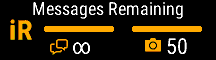
Service Plan |
|
|
 |
- View inReach subscription details and
usage data
|
|
Open
Service
Plan page |
|
|
Select previous Main Menu item |
|
|
Select next Main Menu item |
|
 |
|
|
|
|
|
|
|
Settings |
|
|
 |
- Configure device settings
|
|
Open
Settings page |
|
|
Select previous Main Menu item |
|
|
Select next Main Menu item |
|
|
|
|
|
|
|
|
Edit |
|
|
 |
- Add, remove and reorder Main Menu apps
|
|
Edit
Main Menu configuration |
|
|
Select previous Main Menu item |
|
|
Select next Main Menu item |
|
|
|
|
|
|
|
|
More Apps |
|
|
 |
- View additional Main Menu Apps
|
|
Select previous Main Menu item |
|
|
Select next Main Menu item |
|
|
|
|
|
|
|
|
Check-In |
|
|
 |
|
|
Open
Check-In page |
|
|
Select previous Main Menu item |
|
|
Select next Main Menu item |
|
|
|
|
|
|
|
|
Saved |
|
|
 |
- View and manage saved waypoints, courses and activities
|
|
Open
Saved page |
|
|
Select previous Main Menu item |
|
|
Select next Main Menu item |
|
|
|
|
|
|
|
|
Contacts |
|
|
 |
- View and edit contact information
|
|
Open
Contacts page |
|
|
Select previous Main Menu item |
|
|
Select next Main Menu item |
|
|
|
|
|
|
|
|
Siren |
|
|
 |
|
|
Open
Emergency Siren page |
|
|
Select previous Main Menu item |
|
|
Select next Main Menu item |
|
|
|
|
|
|
|
|
Garmin Share |
|
|
 |
- Share data wirelessly with compatible devices
|
|
Open
Garmin
Share page |
|
|
Select previous Main Menu item |
|
|
Select next Main Menu item |
|
|
|
|
|
|
|
|
Voice Notes |
|
|
 |
- Create, view and manage voice notes
|
|
Open
Voice Notes page |
|
|
Select previous Main Menu item |
|
|
Select next Main Menu item |
|
|
|
|
|
|
|
|
Voice Command |
|
|
 |
|
|
Open
Voice
Command page |
|
|
Select previous Main Menu item |
|
|
Select next Main Menu item |
|
|
|
|
|
|
|
|
|
|
|
|
|
|
|
|
|
|
|
|
|
|
|
|
|
|
|
|
|
|
|
|
|
|
|
|
|
|
|
|
|


